
Further, as requested, please find below the online procedure for Corporate Registration:
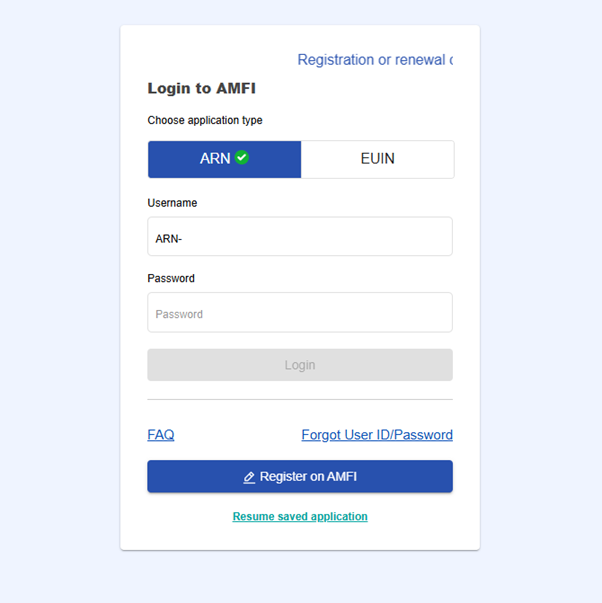
Visit the AMFI portal: amfi.camsonline.com
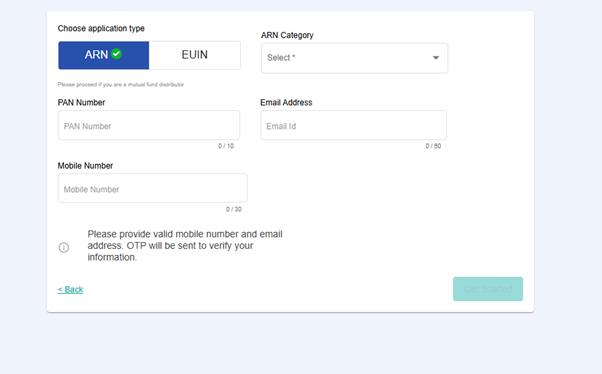
Click on “Register on AMFI”. https://amfi.camsonline.com/amfi-online/sessions/login#/sessions/loginSelect ARN Category as Corporate and choose the appropriate sub-category (Public, Private, LLP, HUF, etc.).
Enter the PAN of the Corporate entity.
Provide the mobile number and email ID where the OTP will be sent.
Enter the OTP received on the registered mobile number and email ID → click “Continue”.
Page 1: Personal Details
Enter the name of the Corporate/LLP
Confirm whether the entity is registered as a SEBI Investment Advisor.
Select “Yes” if applying for Provisional ARN;
Otherwise, select “No”.
Enter the address details as per the address proof.
Click “Continue”
Page 2: Bank Details
Enter the bank details of the Corporate/LLP
Ensure the details match the submitted bank proof.
Click “Continue”.
Page 3: Additional Details
Enter the name, designation, mobile number, and PAN of the Authorised Signatory.
Click “Continue”.
If additional signatories need to be added, click “Add New Signatory”.
Click “Continue”.
Page 4: Document Upload
- Upload all documents in a single PDF or TIFF file as per the checklist for the selected category.
- The authorized signatory’s signature can be uploaded or captured live.
- Click “Continue”.
Documents Required for LLP ARN Registration:
PAN proof
Address proof
Bank proof
Registrar of Companies Certificate
List of Authorized Signatories with specimen signatures
Board Resolution copy
Memorandum of Association (MOA)
Articles of Association (AOA)
Cheque copy
Page 5: Review
Verify all details entered.
For corrections, select “Edit” in the respective field.
Read and accept the undertaking.
Click “Continue”.
You will then be redirected to the payment page, where the applicable registration fee will be displayed.
Select “Pay” and complete the payment.
Note:
Once the payment is successfully completed, the application will be processed subject to:
Document correctness
Compliance with nomenclature guidelines
Realization of payment.
CAMS verifies documents and issues the Final Corporate ARN.