
Overview
This article outlines the step-by-step process for activating joint accounts with the “Anyone or Survivor” holding type on the AssetPlus platform. Since clients cannot select or enter second holder details during activation, the advisor/partner must pre-fill the required information before the client completes the activation process.
Prerequisites
Before initiating the activation process, please ensure the following:
- The client has successfully signed up and is able to log in to the AssetPlus app or web portal.
- For “Anyone or Survivor” accounts, the holding type and second holder details must be entered by the advisor/partner from the dashboard.
- The advisor/partner should have the second holder’s details ready (Name, PAN, Date of Birth, etc.).
Step 1: Enter Second Holder Details from Dashboard
Log in to the AssetPlus Dashboard, search for the client, and open the Client Panel. Navigate to Profile → Add Details, and enter the required details of the second holder.
You may also enter any additional client information available and click on Save Data.



Step 2: Client enters the required info
The client needs to login to the app/website and fill up the required details to proceed further as shown below.
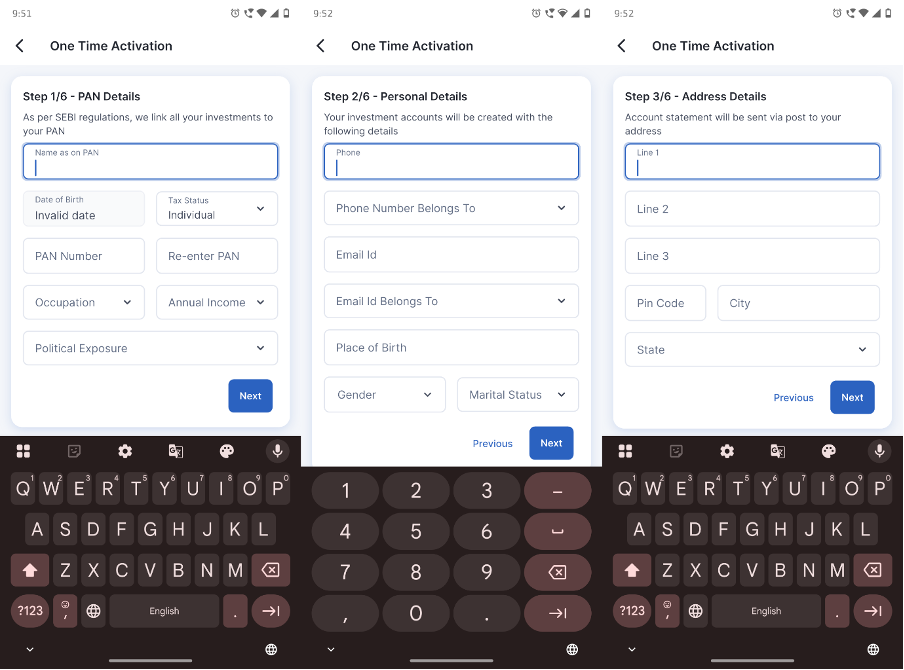
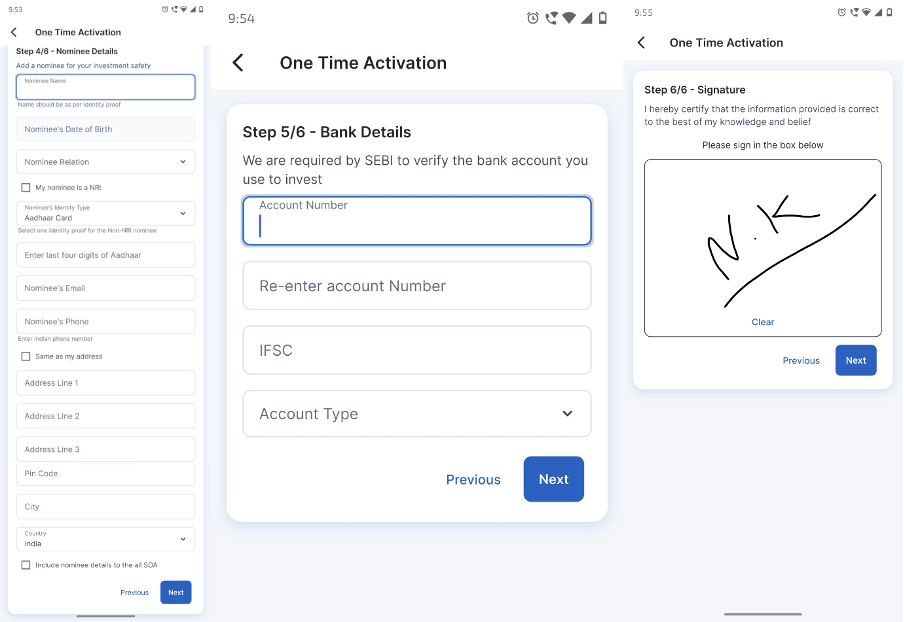
After entering all the required details and completing the digital signature, the client must click Submit to initiate the activation request.
On the dashboard, the client will now reflect as Under Process, which means the client has submitted activation details :

No further action is required from your end or the client's end.
Step 3: Document verification by AssetPlus
Once all required details are submitted, our team will review and verify the client’s information. The activation process is typically completed within 1 hour, subject to validation of all details.
On the dashboard, the client will now reflect as Activated, which means the client is now ready to invest:

Please Note :
The system will not approve the activation in the following cases:
Incomplete KYC :
KYC is a mandatory requirement for investing in mutual funds and stocks in India. Both holders must complete KYC before the account can be activated. If valid KYC is not available, the system will not approve the activation. In such cases, the client will receive instructions to complete the KYC process either online or offline. Once the KYC is successfully completed and verified, the account activation will be approved.
Bank Verification Failure :
The system deposits Re.1 into the bank account mentioned during the activation process. If the account number is wrong, or the name in the bank account doesn't match the name on PAN, the system will not approve. The client will be sent instructions to provide additional bank proof. After he submits the proof, activation will be approved.
Note : If the KYC is not yet completed, please raise a ticket on the Helpdesk, and we will assist you in completing the online KYC process.