
Objective
This SOP explains the offline purchase process for GIFT City investments initiated through Partner → Assetplus OPS → PPFAS AMC, ensuring compliance, accuracy, and timely processing.
Eligible Investors:
Partners can onboard the following investors under the GIFT City framework:
- Resident Individuals (Indian residents)
- Company, LLP ,Partnership Firm (Non Individual)
Partner Process Flow:
Stage 1 – Application Download & Client Documentation:
The Partner/RM must initiate the process by completing the following steps:
- Download the GIFT City Purchase Application Form in the below attachement.
- Share the form with the client and ensure:
- The form is fully filled
- The client provides a wet-ink signature
- Ensure the 14-digit CKYC (KIN) number is mentioned in the application.
How Clients Can Obtain KIN
Clients can retrieve their CKYC number through the following steps:
- Visit www.cersai.org.in
- Go to External Link → CKYCR → View Your CKYC Card
- Enter the mobile number and captcha
- A download link for the CKYC card will be sent via SMS to the registered mobile number.
(Or) Client can dial toll free number- 7799022129, To get your CKYC Number /CKYC Card on mobile.
If CKYC is not available, the CKYC form must be submitted along with the purchase application.
Documents to Collect from Client:
The Partner must collect and submit:
- Completed Purchase Application Form
- CKYC details / CKYC form
- PAN copy
- Bank details
- Nominee details (if applicable)
- Any additional documents required by AMC
Submission to Assetplus:
The Partner must submit the application and documents through either of the following:
- Email: Mf_ops@assetplus.io
- Assetplus Support Ticket
Stage 2 – OPS Verification
Once the application is received:
- The Assetplus OPS team verify the following details
- Broker Code / Sub-broker Code
- EUIN
- Client Name and DOB
- Contact details
- Tax Status
- Bank details
- CKYC status (14-digit KIN)
- Scheme name and investment amount
- Nominee details
- Client signature
If incomplete, OPS will inform the Partner/RM through ticket comments
Stage 3 – Application Submission to AMC
Once verified:
- Assetplus OPS forwards the application to PPFAS AMC
AMC contact emails:
- investoronboarding_gift@ppfas.com
- gift_ppfas@camsonline.com
Zero Folio Creation
- AMC will create a Zero Folio within T+2 days after receiving complete documentation.
- Confirmation will be shared via email to Assetplus OPS and the client.
If any clarification is required, OPS will coordinate with the Partner and AMC.
Stage 4 – Fund Remittance by Client
Once Zero Folio is created, the Partner must guide the client to complete the investment payment.
Step 1 – Payment Link (Selected Banks)
If the investor’s bank is:
- ICICI Bank
- HDFC Bank
- Axis Bank
- IDFC Bank
The AMC will trigger a payment link.
The payment amount will include:
- Minimum Investment: USD 500
- Processing Charges: USD 2
Total Amount: USD 502
Step 2 – Remittance through Other Banks
If the investor uses any other bank, the Partner should guide the client to remit funds as per RBI guidelines.
The client must:
- Visit the bank registered in the folio
- Carry the original PAN card
- Fill Form A2
- Mention the investment amount in USD
- Remit funds to the AMC’s designated account
(Bank remittance details will be shared separately)
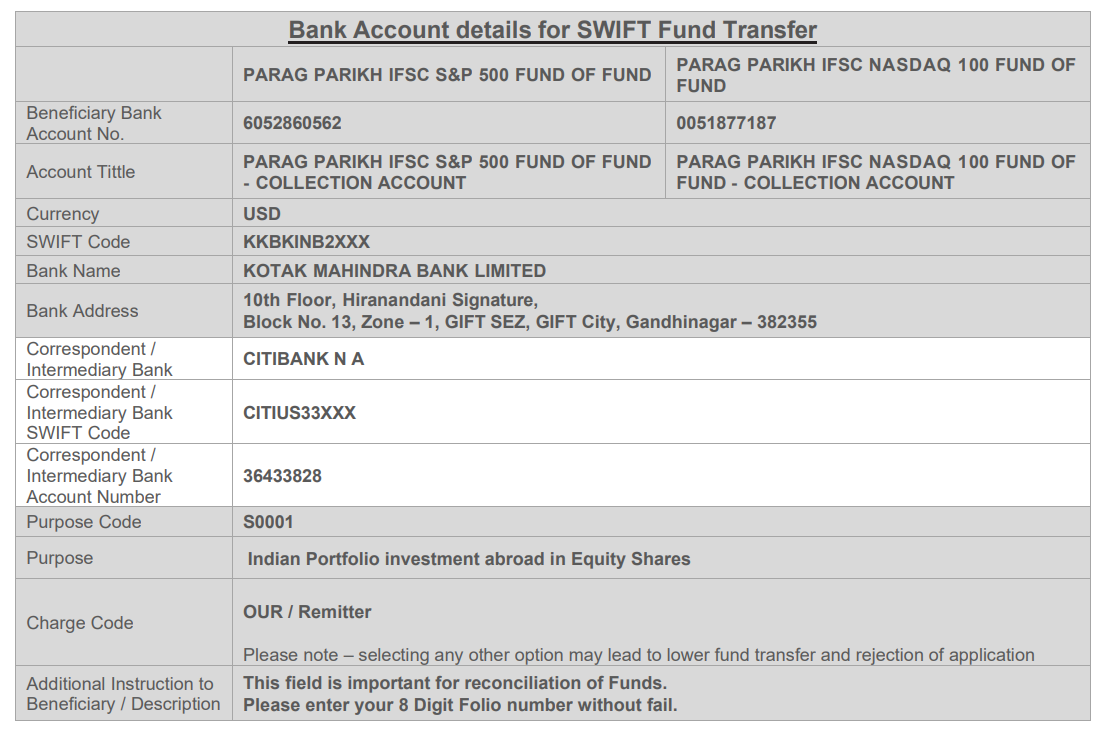
Stage 3 – Remittance Proof Submission
After the fund transfer:
- The client must share the remittance proof.
- The Partner should ensure the proof is submitted via Support Ticket along with the folio number.
- Assetplus OPS will forward the proof to PPFAS AMC and track the unit allocation.
Stage 4 – Unit Allotment
Once funds are realized:
- Units are usually allotted within 1–2 business days.
- The Statement of Account (SOA)will be sent by the AMC to:
- Investor
- Assetplus OPS
OPS will update the Partner and client accordingly.
Stage 5 – Physical Document Submission
After completion of the investment process:
- The client / Partner must courier the original signed application and transaction slip to the AMC.
Courier Address:
ValuePlus Technologies Pvt Ltd,
8th Office Floor - Modules 3A, Olympia Cyberspace, No 21/22,
Alandur Road, Arulayiammanpet, 2nd street,
Guindy, Chennai - 600032.